













Choosing brand colours isn’t about picking your favourite hue or grabbing a cute Canva template. Your colour palette should do work for your business: communicate your vibe, signal your price point, and make your content readable and recognisable every time you post. This guide gives you a simple, step-by-step process to build a practical, intentional colour palette you’ll actually use.
Table of Contents
- Step 1: Start with three non-negotiable rules
- Step 2: Define the feeling you want to create
- Step 3: Find visual inspiration
- Step 4: Choose your primary colours (and their lights and darks)
- Step 5: Add supporting neutrals (non-negotiable)
- Step 6: Pick one or two accent colours
- Step 7: The 5-second readability test (do this now)
- Step 8: Quick list of things not to do
- Step 9: Put it into practice and iterate
Step 1: Start with three non-negotiable rules
Before you pick hex codes, lock in three rules that keep your palette strategic and usable:
- Match your brand energy. Are you calm or bold? Feminine or minimalist? Luxe or affordable? Colours should reflect that energy so your audience instantly knows what you offer.
- Anchor bright colours with neutrals. Beige, cream, gray, brown, black or white give breathing space, improve readability, and make your bright colours pop.
- Make colours usable. Your palette must work in real designs. That means lights and darks for contrast and readable combinations for social posts, PDFs, and marketing materials.
Keep these rules visible while you build your palette. Breaking any one of them is usually why palettes fall flat in practice.

Step 2: Define the feeling you want to create
Start by writing 3 to 5 words that describe how you want people to feel when they encounter your brand. Don’t overthink it—pick words that capture tone and intention.
Examples: playful, calm, wealthy, grounded, energetic, feminine, minimalist, nurturing, bold.
These words will guide every colour decision. If your words are inconsistent, your colours will be too.
Step 3: Find visual inspiration
Use image-driven search (Pinterest is ideal) to pair one of your feeling-words with “colour palette” and scroll for patterns. Look for palettes that consistently match the vibe you wrote down. Save a few that feel right—not to copy, but to inform.
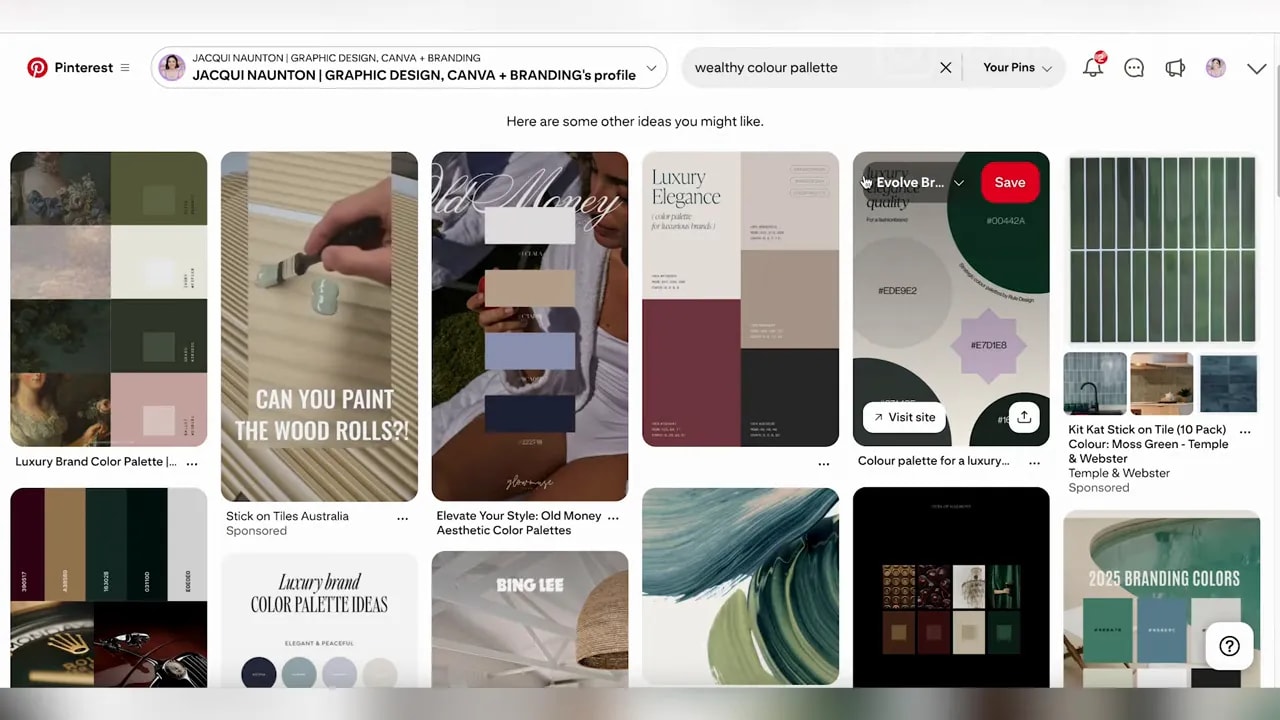
You are allowed to like your colours—especially if you’re a personal brand—but make sure like aligns with strategy.
Step 4: Choose your primary colours (and their lights and darks)
Pick one to three primary colours that express your brand energy. For each primary colour, choose lighter and darker variants. These tonal variations are what make a palette usable across headers, backgrounds and accents.
Tip: Keep the tone consistent. If you pick a bright neon green as a primary, don’t pair it with a muted earthy green. Three related greens work better than three unrelated greens.
FREE Design Tools to $100k Masterclass |
|
Grow your biz with clever design and Canva hacks that will save you hours and make you sales. |
| Get My Free Ticket |
Step 5: Add supporting neutrals (non-negotiable)
Choose at least one light neutral and one dark neutral. Examples include:
- Light neutral: white, off-white, cream, warm beige
- Dark neutral: charcoal, deep gray, warm brown, black
Neutrals control the visual noise, provide readable backgrounds for text, and alter the overall temperature of your brand (gray feels cool, brown feels warm). Choosing the right neutral is as important as choosing your main colour.
Step 6: Pick one or two accent colours
Accent colours are used sparingly to add interest and hierarchy—buttons, CTAs, doodles or occasional posts. An accent should feel like it belongs to the same family, even if you don’t always use it alongside your primary colour.
Example usage split: primary colour ~80% of the time, accent ~20% of the time.

Step 7: The 5-second readability test (do this now)
This is the single most practical test for whether your palette works in real life. Open your design tool, type some sample text (for example, “Hello — this is a test”), place that text using a light colour or neutral on top of a darker brand colour, and check if it’s readable at a glance.
If it’s not readable within five seconds, your palette needs more contrast—add lighter or darker tones, or stronger neutrals. Readability is not optional. If people can’t read your message, they won’t engage.
Step 8: Quick list of things not to do
- Do not copy someone else’s palette without adapting it to your brand feeling and needs.
- Do not pick too many bright colours that compete—fewer, strategic colours are easier to use.
- Do not forget lights and darks. A palette without contrast is hard to use and looks unprofessional.
- Do not change colours each week to match a random template. Consistency builds recognition.
Step 9: Put it into practice and iterate
Create a handful of real assets before you commit: an Instagram post, a flyer, a slide, and a button. Run the 5-second readability test on each. If something feels off, tweak the tones or neutrals rather than switching whole colours.
Over time, consistent use of the same palette increases recognition. When your audience scrolls and sees your brand colour, they should be able to pick you out instantly.
Checklist to finish your palette
- 3–5 feeling words chosen
- Primary colours selected with light and dark variants
- At least one light neutral and one dark neutral
- 1–2 accent colours chosen
- Readability tested across real assets
Choosing colours on feeling, not trends, and building in variance through neutrals, lights and darks will make your palette useful, recognisable and aligned with your business. Test early, iterate quickly, and keep your choices consistent so your brand can do the selling for you.
FREE Design Tools to $100k Masterclass |
|
Grow your biz with clever design and Canva hacks that will save you hours and make you sales. |
| Get My Free Ticket |